At a Glance
Lobby digital signage can do more than reinforce a brand. Planned well, it helps organizations communicate with visitors and employees, share timely information, guide people through a facility, and give staff better ways to handle routine inquiries. The right strategy starts with the purpose of the space, the needs of its users, and the content that needs to reach them. For business leaders planning a lobby renovation or technology upgrade, the recommendation is straightforward: define the communication goals before selecting the displays.
Your Lobby Is Already Communicating. What Is It Saying?
A visitor walks into your building. The reception desk is occupied, a meeting is running late, and the visitor isn't sure where to go. A display on the wall is showing a corporate video, but it doesn't answer the visitor's immediate question. Another screen near the entrance lists an event that ended last week.
The technology is working. The communication isn't.
This is a common planning mistake in commercial lobby design. Organizations invest in attractive displays and expect the environment to feel more modern, but the screens don't always have a defined job. They can look impressive without helping visitors, employees, reception teams, or the business itself.
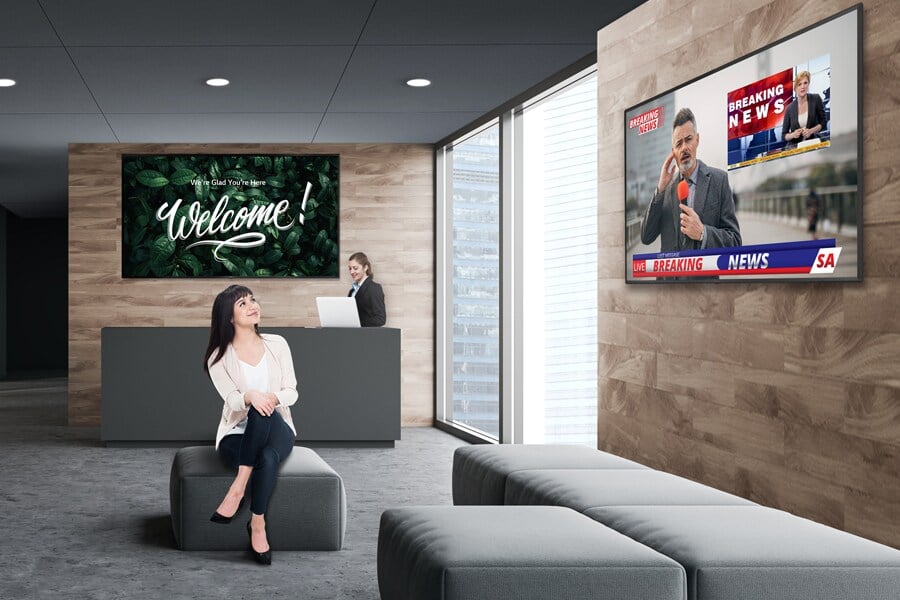
Lobby digital signage deserves a place in the broader design of a business environment. Displays can reinforce brand identity, communicate announcements, share event and facility information, and help people find the information they need. Interactive kiosks can give visitors another way to access information and services. Different display types can serve different purposes within the same space.
The distinction matters: a lobby display strategy should be designed around what people need to know and do, not simply what an organization wants to show.
For IT leaders, facilities teams, workplace strategists, and executives, that means treating the lobby as a working communication environment. Technology selection comes after the business purpose is clear.
What Should Lobby Digital Signage Accomplish?
Lobby digital signage should solve a specific communication or operational problem. The strongest plans begin by identifying the audiences who use the space, the information they need, and the actions the environment should make easier.
A corporate headquarters, hotel, healthcare facility, university, and public-facing office won't have identical needs. A headquarters might prioritize brand storytelling and employee announcements. A healthcare facility may need clear directions and service information. A conference venue may need to communicate room assignments, schedules, and event updates.
Before choosing hardware, identify the main functions your lobby needs to perform.
Reinforce the brand without turning every screen into an advertisement.
A large-format LED display can provide a visual focal point and present brand content, corporate messaging, or other planned visual experiences. It may be appropriate in a prominent entrance where visibility and scale matter.
But a display that dominates the room can become a distraction if its content has little relevance to the people passing through. Brand communication works best when it fits the setting and complements the visitor experience.
Keep Information Current
Digital signage can communicate announcements, event details, and facility updates without replacing physical signs every time information changes. Networked displays and compatible content management platforms can help organizations coordinate messages across locations or screens.
That capability comes with a responsibility: someone must own the content. If nobody is accountable for reviewing schedules, removing expired notices, and approving messages, a digital display can become a more expensive version of an outdated poster.
Help Visitors Find Information and Services.
Self-service kiosks can provide access to information and services, reducing the need for visitors to rely exclusively on reception staff for routine inquiries. Their usefulness depends on the tasks they support, the clarity of the interface, their placement, and whether visitors can use them comfortably.
A kiosk should make a task easier, not introduce another step between a visitor and the information they need.
Improve the Experience for People Working Behind the Desk
Lobby technology also affects employees. Reception and administrative teams may need to respond to inquiries, coordinate appointments, manage event information, or communicate with internal departments.
A well-planned environment considers those workflows alongside the visitor-facing displays. LG UltraWide desktop monitors, for example, offer a 21:9 aspect ratio that may suit staff workflows requiring a wide working area. The benefit depends on the applications and tasks the employee actually uses.
The business case should connect each technology choice to a defined need. If a display has no clear audience, purpose, or content owner, pause before adding it to the plan.

How Do You Choose the Right Displays for a Lobby?
Choose displays by matching each technology to its intended use, viewing conditions, content, and operational requirements. There is no single display type that is best for every lobby, and the largest screen isn't automatically the best investment.
LG's lobby solutions portfolio illustrates how different technologies can serve different roles within one environment.
| Technology | Potential Lobby Role | Planning Consideration |
|---|---|---|
| Direct view LED (DVLED) | A large visual focal point for brand messaging and prominent content | Viewing distance, screen scale, brightness, installation requirements, and content design |
| Commercial digital signage | Announcements, wayfinding information, event details, and employee or visitor communications | Screen placement, content scheduling, visibility, and centralized management |
| Interactive kiosk | Self-service access to information and services | User tasks, accessibility, interface design, placement, and device integration |
| Transparent OLED | A distinctive visual element where maintaining a sense of openness matters | Viewing conditions, sightlines, intended content, and the surrounding architecture |
| Electronic paper (ePaper) | Lower-power display of changing information, such as event or facility updates | Update frequency, viewing needs, installation method, and content management |
| Window-facing signage | Communication visible from outside a building | Ambient light, viewing distance, brightness requirements, and building conditions |
These are starting points, not a substitute for project-specific design.
Match the Display to the Viewing Environment
A display that looks clear in a showroom may behave differently in a lobby with strong daylight, reflective surfaces, long viewing distances, or changing sightlines. Window-facing signage, for example, has different visibility requirements from a display mounted behind a reception desk.
LG's high-brightness window-facing displays rated at 4,000 nits, along with smart brightness control. That specification is a product capability, not a guarantee that one model will be appropriate for every window or lighting condition. The actual selection should follow an assessment of the installation environment and the content to be displayed.
For a large-format LED installation, consider how visitors approach the screen, how far away they stand, and whether the content remains legible from the main circulation paths. A striking image can make an impact, but information-heavy content needs to be readable as well.
Plan the Content Before Finalizing the Screen
The content determines what the display must do. A screen intended for high-level brand imagery has different requirements from one showing detailed event schedules or visitor instructions.
Consider how quickly people can understand the message, how often it changes, and whether the information needs to be accessible from multiple angles. For a lobby with several screens, decide whether each screen has a distinct role or whether some content should be repeated.
This is also the time to determine who will provide, approve, schedule, and update the content. Hardware selection without a content plan leaves a significant operational question unanswered.
Consider the Entire System, Not Just the Panel.
A commercial display is one part of a larger installation. The project may also require mounting, power, network connectivity, control, content management, device configuration, integration with other systems, testing, documentation, and ongoing support.
LG identifies solutions such as webOS, SuperSign Cloud, and ConnectedCare within its business display ecosystem. Their suitability depends on the selected products, required functionality, licensing or service terms, and the organization's operating model. Compatibility and responsibilities should be confirmed during planning.
For organizations managing several locations, consistency may be as important as the display itself. A plan that accounts for standards, content ownership, remote management, and future service needs can make a multi-site rollout easier to govern.
The Lobby Communication Fit Framework: A Practical Way to Plan
A useful way to evaluate a lobby project is to work through five factors before requesting equipment pricing. The Lobby Communication Fit Framework connects the reason for the investment to the decisions that will affect its long-term value.
| Factor | Question to answer | What it informs |
|---|---|---|
| Purpose | What should the display help people understand or do? | The use case and desired outcome |
| Audience | Who needs the information, and where will they encounter it? | Placement, viewing distance, accessibility, and message design |
| Content | What will appear on screen, and how often will it change? | Display type, resolution needs, scheduling, and content workflow |
| Operations | Who manages the devices, content, and support? | Management platform, permissions, service model, and ownership |
| Lifecycle | How will the installation be maintained and updated? | Documentation, service access, refresh planning, and future expansion |
Use the framework in a planning meeting with IT, facilities, communications, reception, and any other teams responsible for the space. Ask each group to identify its requirements and constraints before the project team settles on a design.
The framework also helps distinguish must-haves from attractive extras. A display that supports a defined business function may warrant investment. A second or third screen that repeats the same content without adding value deserves closer scrutiny.
One useful rule: if a proposed display cannot be tied to a specific audience and purpose, it hasn't earned its place in the design yet.
What Does a Coordinated Lobby Display Strategy Look Like in Practice?
Consider a hypothetical corporate headquarters planning a lobby renovation. The organization wants a stronger brand presence, more current event information, and fewer routine questions directed to reception.
Buying one large video wall may address the first goal, but it doesn't automatically address the other two.
A more deliberate plan would assign distinct roles to the technology. A large-format LED display could present brand content in the main entrance. Commercial signage could communicate event schedules and facility announcements. A kiosk could provide access to approved visitor information and services, provided the organization has defined the required workflows and any necessary integrations.
Staff would have a separate assessment of their workstation needs. The project team would also define who updates content, how urgent changes are handled, which systems require network access, and who responds when a display or kiosk stops working.
The organization would then evaluate the proposed design against the five factors in the Lobby Communication Fit Framework. It could compare the coordinated solution with a simpler installation and decide which features justify their cost and ongoing management.
The example is hypothetical, but the decision process is broadly applicable: define the job, assign the technology, and plan the operation before committing to the equipment.
That sequence also gives decision-makers a clearer way to evaluate vendors. Instead of comparing proposals only by screen count or hardware price, they can ask how each design addresses the requirements that matter to the organization.

How Should It and Facilities Teams Plan for the Full Lifecycle?
Treat the lobby display installation as a managed technology environment from the beginning. That means accounting for infrastructure, system ownership, documentation, maintenance, and future changes as part of the project rather than leaving them until after installation.
IT and facilities teams should align on network and power requirements, mounting conditions, physical access for service, device security, and any connections to other systems. Communications or marketing teams should define content responsibilities, review processes, and publishing schedules. Reception or administrative teams can help validate the visitor experience.
A coordinated design and integration process can bring those needs together before installation. Depending on project scope, a technology integration partner can assist with system selection, infrastructure coordination, installation, configuration, testing, documentation, and ongoing support.
The support model deserves particular attention for organizations with multiple locations or limited internal resources. Ask how issues will be reported, who owns troubleshooting, which services are covered, and what happens when equipment needs repair or replacement.
Lifecycle planning also gives the organization a way to review the installation later. Has the content remained relevant? Are the screens serving their intended audiences? Have business needs changed? Are the devices and management tools still appropriate? These questions help guide future adjustments and refresh decisions.
The goal isn't to predict every future requirement. It's to avoid making the initial installation so rigid that ordinary changes become expensive projects.
Plan Your Lobby Around the Experience You Want People to Have
The most effective lobby display strategy starts with a clear understanding of the space, its users, and the communication the organization needs to deliver. The right mix of displays may include LED, commercial signage, kiosks, transparent OLED, or ePaper, but the technology should follow the purpose.
Solutionz helps organizations plan and integrate audiovisual and technology environments around their operational needs. If you're considering a lobby renovation, new commercial displays, or a coordinated signage deployment, talk with Solutionz about a lobby display strategy that connects the technology to your business goals.